


As I teased yesterday, I’ve been mucking around with virtual machines to extend my ability to test Mix. Due to the varied nature of our users’ environments, I need to find ways to install more browsers, more versions on more operating systems.
Everyone knows reproducing an issue is really the best way to begin fixing it. Until recently, I had IE7, Firefox 2, Opera, Flock and Safari all running happily on my XP laptop. Then I upgraded my Mac to Firefox 3 and wanted to use it on XP as well, which lost me Firefox 2. I found out later I could have installed them side-by-side, but it’s too late now.

Plus, we’re getting more IE6 users lately, and I didn’t have an instance of IE6 running anywhere for testing because, of course, I lost that long ago by upgrading to IE7. I recently bolstered the memory on my Macbook, so I decided to take Rich and Anthony’s advice and install VirtualBox, confident that I had enough computing power. I’ve been meaning to make the jump to Ubuntu for a while, on Rich’s recommendation, and I figured this would be a good starting project.
It’s been nearly ten years since I worked with virtual machines and dual booting. All that left me convinced that one O/S was the way to go. All the computing power and disk required to run these programs made them questionably worth the time spent.
The lure of running two computers on a single set of hardware is intriguing, at least to me and likely to many of you, unless you’ve stumbled here by accident. Dual booting has its advantages, but I always preferred virtual machines because I found that I only used one O/S on a dual boot drive, basically wasting that other part of the disk. Besides, it’s a hassle to power down and then back up in another O/S. Plus, forget about sharing data aside from a floppy disk. Remember those 1.44 MB honeys?
So, virtual machines were my choice, but they had issues too. Mainly, the performance was terrible, even on the biggest and best we had at the time. I remember the early versions of VMWare were sweet, but performed poorly.
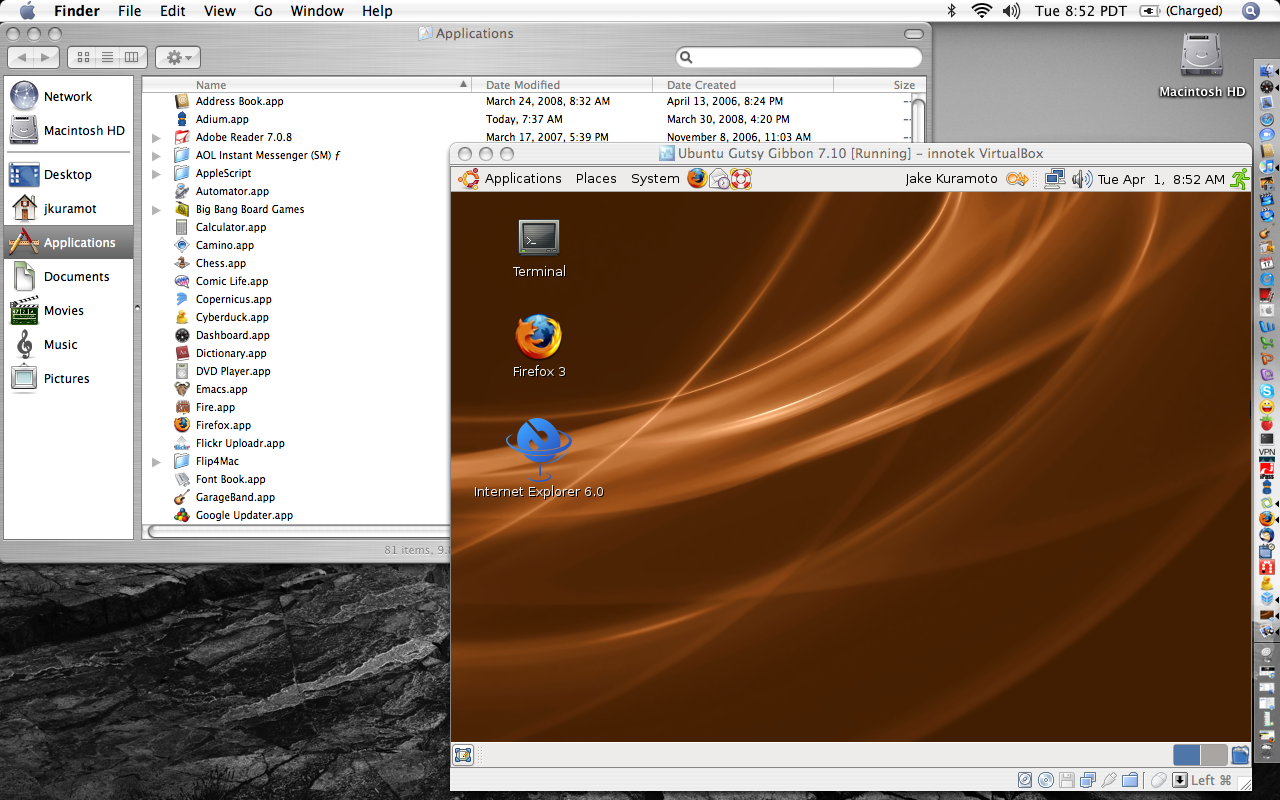
Fast forward to today, and I’m up and running Ubuntu Gutsy in less than half an hour on VirtualBox. It’s super fast, and the only distressing thing is the fan on my Macbook sounds like a jet engine when I run an image for too long.
No biggie. I find a geeky pleasure in running Vista and Ubuntu virtually on my OS X laptop. Maybe this is because it was so tough to run multiple O/S back in the day.
Initially, I hoped to run IE6 on Ubuntu using Wine and ies4linux, but once I had them all installed, it took 10 minutes to start IE6, no joke. I thought nothing was happening and gave up, until 10 minutes later, an IE6 window began to open. It took another five minutes to finish opening. Not exactly tuned for testing.
Of course, IE6 won’t run on Vista natively, and Rich warned me away from using the image published by Microsoft that runs on MS Virtual Box. The image is time-bombed anyway, which I don’t get. Rich sent me an XP image, but it won’t run on my Mac for some odd reason, so I’m left with one choice.
His image does run on my XP laptop, so I’m running XP virtually on XP. Oh the irony. And all that just to run IE6. I guess this weekend, I’ll try to rebuild the XP image on my Mac.
I now have an easy way to test pretty much every O/S and browser combination Mix users can throw at us.
This is my adventure in virtualization. Very cool stuff, if you’re into that.
Have you dabbled in virtual machines? What are your thoughts? Have any horror stories or anecdotes from way back in the day? Let them be free in comments.
Update: Humorous, at least to me, I’m rebuilding Rich’s XP using my own XP upgrade disk, and after installing SP2 and 87(!) high priority updates, the IE7 update nearly sneaked by me. That would have been a very, un-funny April Fool’s played by me on me.

Not sure there’s a compelling reason to fire up a virtual machine to run wine or ies4linux. Try http://mike.kronenberg.org/?p=63
Having said that. ies4linux and wine don’t really give you a complete sense of an end users Windows/IE/yourwebsite experience.
Not sure there’s a compelling reason to fire up a virtual machine to run wine or ies4linux. Try http://mike.kronenberg.org/?p=63
Having said that. ies4linux and wine don’t really give you a complete sense of an end users Windows/IE/yourwebsite experience.
@Drew: Very cool, I didn’t know about ies4mac. Sounds like a resource piggy. I got the XP machine running fine on Mac now, and running it is pretty painless. I like the VM solution.
@Drew: Very cool, I didn’t know about ies4mac. Sounds like a resource piggy. I got the XP machine running fine on Mac now, and running it is pretty painless. I like the VM solution.
I have been playing around with virtual machines for a very long time. Started with VirtualBox about a month back. VirtualBox has been the simplest to configure and use. VirtualBox OSE is definitely something you don’t want to try out. Its very buggy. However, the licensed version shipped with the installer is much better. None the less, its still buggy. The best part of VirtualBox is that the images are very portable. My friend installed Solaris on his mac using VirtualBox and I had to copy the image to get it running on my x86-64. Sweet.
I have been trying out legacy operating systems on VirtualBox, like Slackware 96. Installation started but then it conked. Had some luck with Red Hat 5.2, but the installation hung at the last stages. Planning to try out BeOS and OS2Warp.
The other interesting think what I did, is a nested virtual machine installation. Installed Windows XP on openSuse 10.3 x86-64 host. Then installed Virtual Box on Windows XP and then tried Ubuntu with Windows XP as guest. The installation did not start. Not sure why. Will give this a shot again.
The other good thing about VirtualBox is that it is very scalable. I could run Windows XP, Solaris 10 and Slackware 11 at the same time on openSuse 10.3 host without actually having any lag. My configuration is good. Here is my configuration:
AMD Athlon 64 X2 4000
6GB Dual Channel DDR2 667
250 + 200 GB SATA HDD
openSuse 10.3 x86-64 (Kernel Recompiled)
(Dual Booted with Slackware 12)
Yes, I am a Slackware and openSuse fan. Slackware is the quickest and openSuse is very well suited for a desktop. I strongly recommend you try these out.
And, ies4linux works beautifully on my openSuse box. Not sure whats wrong with your installation.
I have been playing around with virtual machines for a very long time. Started with VirtualBox about a month back. VirtualBox has been the simplest to configure and use. VirtualBox OSE is definitely something you don’t want to try out. Its very buggy. However, the licensed version shipped with the installer is much better. None the less, its still buggy. The best part of VirtualBox is that the images are very portable. My friend installed Solaris on his mac using VirtualBox and I had to copy the image to get it running on my x86-64. Sweet.
I have been trying out legacy operating systems on VirtualBox, like Slackware 96. Installation started but then it conked. Had some luck with Red Hat 5.2, but the installation hung at the last stages. Planning to try out BeOS and OS2Warp.
The other interesting think what I did, is a nested virtual machine installation. Installed Windows XP on openSuse 10.3 x86-64 host. Then installed Virtual Box on Windows XP and then tried Ubuntu with Windows XP as guest. The installation did not start. Not sure why. Will give this a shot again.
The other good thing about VirtualBox is that it is very scalable. I could run Windows XP, Solaris 10 and Slackware 11 at the same time on openSuse 10.3 host without actually having any lag. My configuration is good. Here is my configuration:
AMD Athlon 64 X2 4000
6GB Dual Channel DDR2 667
250 + 200 GB SATA HDD
openSuse 10.3 x86-64 (Kernel Recompiled)
(Dual Booted with Slackware 12)
Yes, I am a Slackware and openSuse fan. Slackware is the quickest and openSuse is very well suited for a desktop. I strongly recommend you try these out.
And, ies4linux works beautifully on my openSuse box. Not sure whats wrong with your installation.
@Venkataramanan: I think what’s wrong with my ies4linux is that I have way less computing power than you do. I agree with you overall assessment that VB works well, and I did test the portability of images with Rich and between my own machines.
I like your idea of running old O/S. I’d like to see a Win 3.11 or NT 3.51 instance running on a Mac OS X host or something similar. That would rock.
@Venkataramanan: I think what’s wrong with my ies4linux is that I have way less computing power than you do. I agree with you overall assessment that VB works well, and I did test the portability of images with Rich and between my own machines.
I like your idea of running old O/S. I’d like to see a Win 3.11 or NT 3.51 instance running on a Mac OS X host or something similar. That would rock.
I’ve been using VMWare Fusion on my macbook pro for probably 6 months now, and I’m pretty happy with it… I’ve run both XP and Linux images and they work quite well.
They are even pretty responsive if I’m not running anything too memory hoggish on the native side…
Too bad Oracle VM isn’t available for the Mac yet…
I’ve been using VMWare Fusion on my macbook pro for probably 6 months now, and I’m pretty happy with it… I’ve run both XP and Linux images and they work quite well.
They are even pretty responsive if I’m not running anything too memory hoggish on the native side…
Too bad Oracle VM isn’t available for the Mac yet…
@Warren: If you follow Mix at all, you’ll know you’re not in the minority wanting better support for Mac.
I’m very happy with VirtualBox. VMWare is great too, but VB works great. I can Vista on my Macbook and use OS X and Vista at the same time without any performance issues. Nice.
@Warren: If you follow Mix at all, you’ll know you’re not in the minority wanting better support for Mac.
I’m very happy with VirtualBox. VMWare is great too, but VB works great. I can Vista on my Macbook and use OS X and Vista at the same time without any performance issues. Nice.
Its just for IE, but you don’t need any virtualization to run multiple versions of IE.
From IE 3 to IE 6 you can use this app from Trendsoft http://tredosoft.com/Multiple_IE 🙂
I hope it helps.
João
Its just for IE, but you don’t need any virtualization to run multiple versions of IE.
From IE 3 to IE 6 you can use this app from Trendsoft http://tredosoft.com/Multiple_IE 🙂
I hope it helps.
João
@João: Thanks, this is actually what ies4linux installs to run on Wine. I guess I should have figured out for myself that it exists natively for Windows.
@João: Thanks, this is actually what ies4linux installs to run on Wine. I guess I should have figured out for myself that it exists natively for Windows.